20.5.0 Cloud Release Highlights
Date: November 25, 2026
Pia - Now General Access
Pia, the AI-based Process Intelligence Assistant in Process360 LiveProcess360 Live iGrafx's cloud platform for end-to-end process management — combining process design, mining, simulation, and automation in a single environment., is now General Access. Pia drafts diagrams from a conversation, analyzes and translates existing diagrams, and writes the IQL queries behind search and reports, working on the process structure, governance, and data already in your repository.
Pia GA is licensed as the Pia module with consumption-based pricing. Each Pia feature uses credits, and your license card under Admin → License → License Management shows the credits your license includes. With this release the Pia Early Access program ends, and using Pia requires a Pia license. Existing Pia Plus subscriptions move to Pia GA and continue under their current terms until renewal. Process models created with Pia remain in your repository and are not affected.
To add Pia, contact your account executive or email pia@igrafx.com.
Read more: Process Intelligence Assistant — Pia
Simulation - Monitors for Elapsed Time
Monitors measure how long cases take between two points in a process. A Start monitor on one shape and an End monitor on another, each with an optional When condition, record the elapsed time between them, and the simulation statistics show the results on a new Monitors tab.
Read more: Simulation shape properties
Search - File and People Filters and Version Results
New Search finds more precisely: filter results by file type, or by the person who owns, created, last changed, or checked out an object, and see in the Version column whether each result is the latest version, the approved version, or a version upcoming approval. Users who manage repositories see when a repository's search index has finished updating. An administrator turns on the New Search Early Access feature to use it.
Read more: Search the platform
Diagramming - Custom Diagram Themes
Administrators can now design diagram themes in your organization's colors on the new Diagram Themes page, with a brand color, an optional secondary color, a light or bold emphasis, and a modern or classic shape style. Every repository can use a custom theme as its default or for a single diagram. The new built-in Minimal and Contrast themes join Black & White, and the themes from earlier releases stay available as Older themes, with the former default theme now named Pistachio.
Read more: Customize the platform
Diagramming - Multilingual Shape Libraries
Items in a custom shape library can now carry a name in each of the repository's content languages, so the Shapes panel, the Quick Shape Menu, and the Shape Legend show every reader the names in their own language. You can also add a shape you've drawn and styled in a diagram to a custom library by dragging it there, or replace an existing item with it.
Read more: Shape libraries
Reporting - Redesigned Report Results
Report results are easier to work with: each column has its own menu for sorting, filtering, and renaming, a Sort panel sorts by several columns at once, and active filters show as chips you can clear in one click. Columns that show an object's subtype, resource type, or risk rating can now be filtered too. Control assessments are downloaded from a new Control Assessments tab on the Reports page, which requires the Control Assessment Tab Early Access feature.
Read more: View and refine a report
Governance - Retention Rules
Retention rules keep a repository tidy on a schedule: an IQL query selects the objects, and the rule archives them, moves them to another folder, sends them to the Recycle Bin, or deletes them permanently. You can preview the objects a rule affects before you activate it, and set the order in which the rules run. An administrator turns on the Data Retention Policies Early Access feature to use them.
Read more: Data retention and archiving
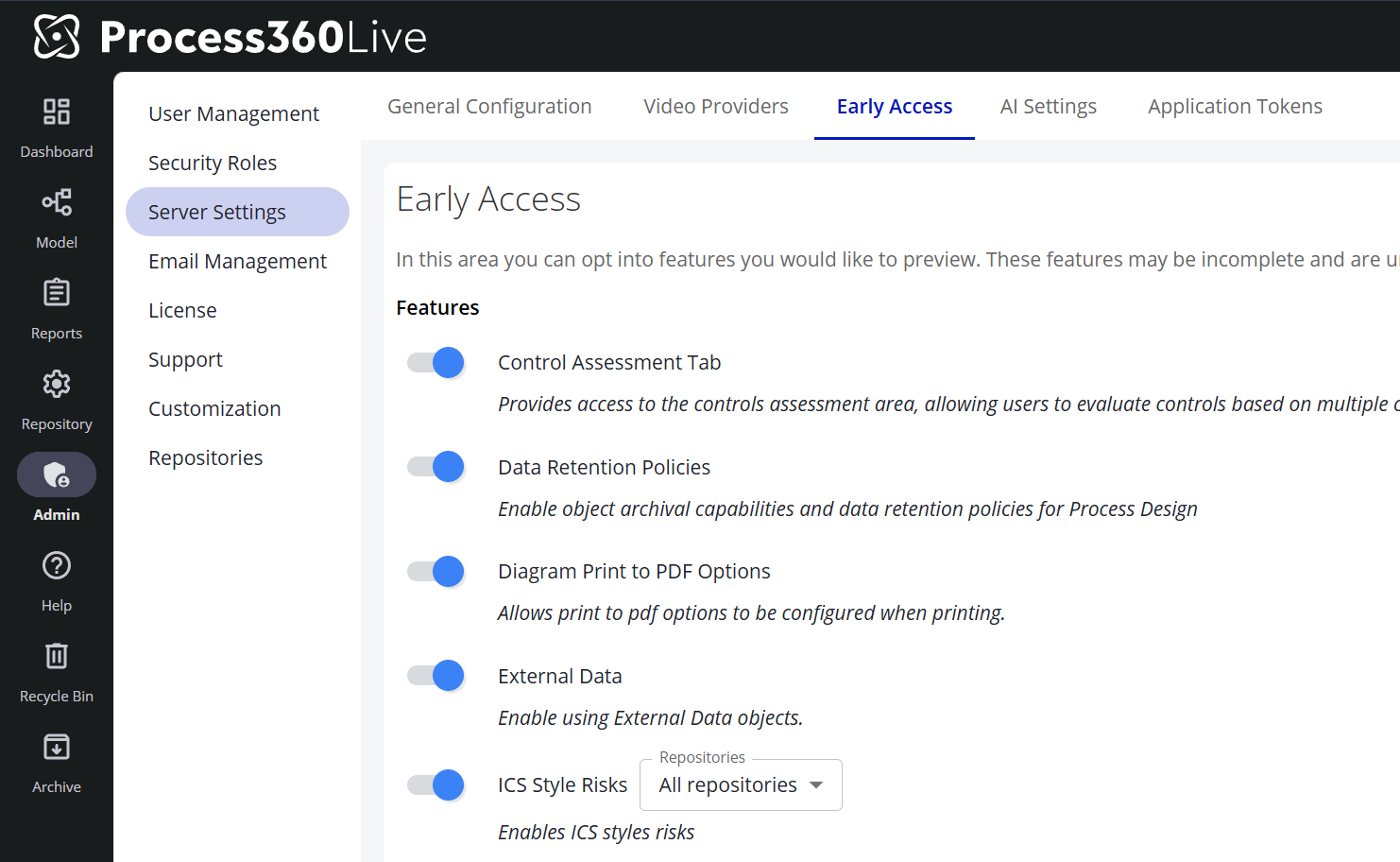
How to enable Early Access features
-
Go to Admin → Server Settings
-
Navigate to the Early Access tab.
-
Toggle the features you would like to enable
Note: Features with a ℹ️ icon are in General Access. These features are fully released; customers are provided a temporary window to disable these features to perform internal training and communications before the feature is permanently enabled.
Security - Sign-In Expires After 24 Hours
By default, Process DesignProcess Design The discipline of explicitly modeling business processes to document, analyze, and optimize them. In Process360 Live, process design is the authoring side that complements mining's data-driven view. now signs you out 24 hours after you sign in, even while you're working, and you sign in again to continue.
Read more: User menu