Use the external data generator
Generate cases at the times recorded in real data — for example, the actual arrival times of orders — instead of a statistical interval.
Prerequisites
- The External Data feature, enabled by a server administrator under Admin → Server Settings → Early Access (the External Data feature flag). When the flag is off, External Data doesn't appear among the generator types.
- Edit access to a simulation project — see Simulation.
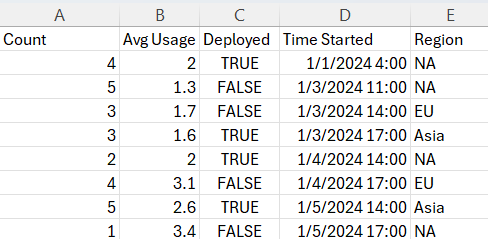
- A data file or repository object with one column of case generation times in ISO format:
Steps
-
Select the shape that should generate the cases and open its Generator tab. Turn on Generate Here and set Generator Type to External Data.
-
Click New. The Add external data wizard opens on Step 1 - Select data:
- Repository — pick an External Data or External File object with the object picker. Linking an External Data object keeps the generator current: when newer data is uploaded to the object, the generator follows it. See Work with external data.
- Upload — upload a file from your computer. XLS/XLSX, CSV, TSV, and TXT files up to 32 MB are accepted.
-
Click Next Step and choose the column with the case generation times. The first possible column is preselected.
-
Click Next Step and choose the column with the number of cases to generate per row. If the data has no count column, click Reset to clear the choice — each row then generates one case.
-
Click Next Step and map any remaining columns to the case variables they should initialize. Columns are auto-mapped to variables of the same name; columns that match no case variable are ignored.
-
Click Next Step, review, and click Finish.
Verify
- The Generator tab shows the imported data behind the View data button.
- A traceTrace The ordered sequence of activities executed for a single case. Grouping cases by identical traces produces variants. run generates cases at the times in the data.
Related
- Work with external data — creating and refreshing External Data objects
- Simulation shape properties
- Use table variables — the other consumer of imported tables