Simulation shape properties
This reference lists the shape-level tabs and fields of the simulation properties window — what you see when you select a shape and then click Properties in the simulator toolbar. The window title is Simulation Shape Properties followed by the shape name. For model-level tabs, see Simulation properties. Optional fields hide behind the More button until you add them.
If the diagram uses BPMNBPMN An ISO/OMG standard graphical notation for modeling business processes. Process360 Live uses BPMN 2.0 for design and simulation artifacts. shapes, give each Flow Object the behavior the BPMNBPMN An ISO/OMG standard graphical notation for modeling business processes. Process360 Live uses BPMN 2.0 for design and simulation artifacts. specification expects — see the BPMN shape behavior in simulation guide.
Generator
Any shape can generate cases: turn on Generate Here.
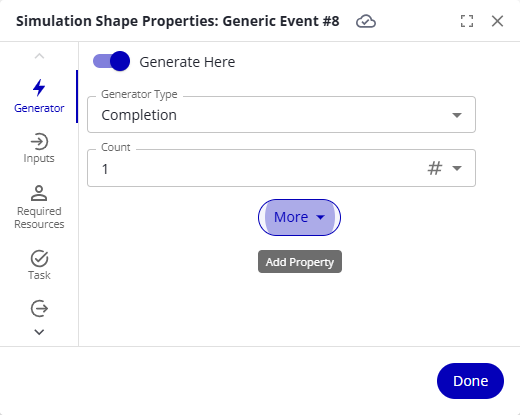
| Generator Type | CasesCase A single instance of a process — for example, one customer order, invoice, or support ticket. An event log groups events by case ID. generate… |
|---|---|
| Completion | When the previously generated group of cases finishes. |
| Interval | Once per interval. |
| External Data | At the times listed in imported data — see Use the external data generator. |
| Timer | Each time the chosen timer fires. |
| Message | When the shape receives the specified message from the specified messaging partner. CasesCase A single instance of a process — for example, one customer order, invoice, or support ticket. An event log groups events by case ID. generated this way are correlated with the case that triggered them. |
| Variable Change | When a variable meets the chosen Change Type condition: Increased, Decreased, Changed (any change of value), or Assigned (any assignment, even to the same value). |
Other properties, depending on the type:
| Property | Description |
|---|---|
| Count | The number of cases generated each time. |
| Interval | The time between generations, for an Interval generator. |
| Spread | How an Interval or External Data generator distributes its cases: Evenly, Random, or All at Start. |
| Max CasesCase A single instance of a process — for example, one customer order, invoice, or support ticket. An event log groups events by case ID. | The generator stops after generating this many cases. |
| Initial Count (optional) | The first generation produces this many cases instead of Count. |
| Schedule (optional) | The generator only generates while the schedule is in service. |
| Force Into Active Period (optional) | When on, a generation that falls outside the schedule waits for the schedule to come into service, generates immediately, then waits the interval again. When off, out-of-schedule generations are skipped. |
| Only If (optional) | A condition evaluated before each generation; cases generate only when it is true. |
| Delay (optional) | The wait at the start of the simulation before the first generation. |
| Stop After (optional) | The generator stops after this much simulated time. |
| Message name, Messaging partner | For a Message generator — the message to wait for, and the process it must come from. |
Inputs
An input gate holds cases back before they enter the activityActivity A named step in a process (e.g. "Approve Invoice"). Each event in an event log records one activity occurrence for one case.: turn on Input Gate.
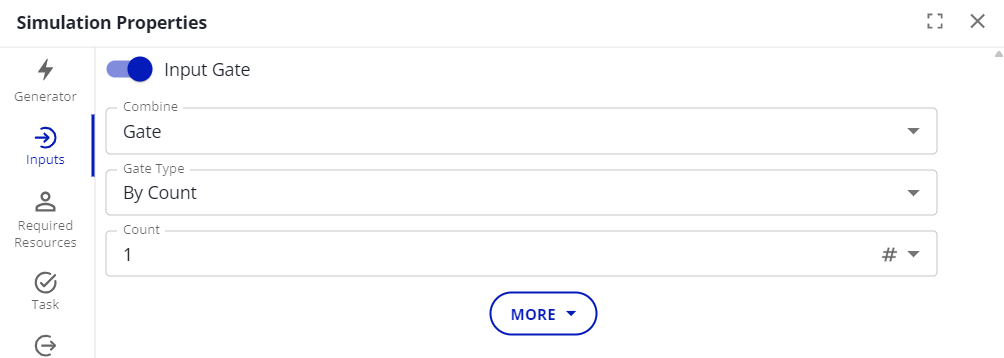
Combine sets what happens to cases that pass the gate together:
| Combine | Effect |
|---|---|
| Gate | Nothing extra — the cases pass through. |
| Batch | The cases merge into a single case; an Unbatch gate later splits them apart again. |
| Join | A new case is created from the combined cases. CasesCase A single instance of a process — for example, one customer order, invoice, or support ticket. An event log groups events by case ID. that belong to a family only join members of the same family; if an entire family joins, the result is the original case. CasesCase A single instance of a process — for example, one customer order, invoice, or support ticket. An event log groups events by case ID. without a family join each other. |
Gate Type sets what releases the cases:
| Gate Type | CasesCase A single instance of a process — for example, one customer order, invoice, or support ticket. An event log groups events by case ID. pass when… | Properties |
|---|---|---|
| By Count | A set number of cases is waiting. | Count; Maximum Wait — after this long, waiting cases pass even if too few; Minimum Count — but never fewer than this many. |
| By Family | The entire case family is present. | — |
| By Time | A repeating interval elapses. | Interval; Initial Delay; # CasesCase A single instance of a process — for example, one customer order, invoice, or support ticket. An event log groups events by case ID. Per Release — leave empty to release all waiting cases. |
| By Expression | The expression evaluates to true. | Expression. |
| By Timer | The chosen timer fires. | Timer; # CasesCase A single instance of a process — for example, one customer order, invoice, or support ticket. An event log groups events by case ID. Per Release. |
| By Enumerated Type | One case is waiting for each value of an enumerated type. | Type; Variable — the case variable holding the value. |
| From Input Paths | One case has arrived from each connector line into the activityActivity A named step in a process (e.g. "Approve Invoice"). Each event in an event log records one activity occurrence for one case.. | — |
| Delay | Each case has waited a set time. | Delay. |
| Unbatch | Immediately — batched cases unbatch here. | — |
| Multiple | A combination of time and expression gates triggers. | Any (any gate releases) or All (all must trigger at once); # CasesCase A single instance of a process — for example, one customer order, invoice, or support ticket. An event log groups events by case ID. Per Release. |
| Until Message | The specified message arrives from a correlated case in the specified process. | Message name; Messaging partner. |
Required Resources
Specify the resources a case needs before the task can start.
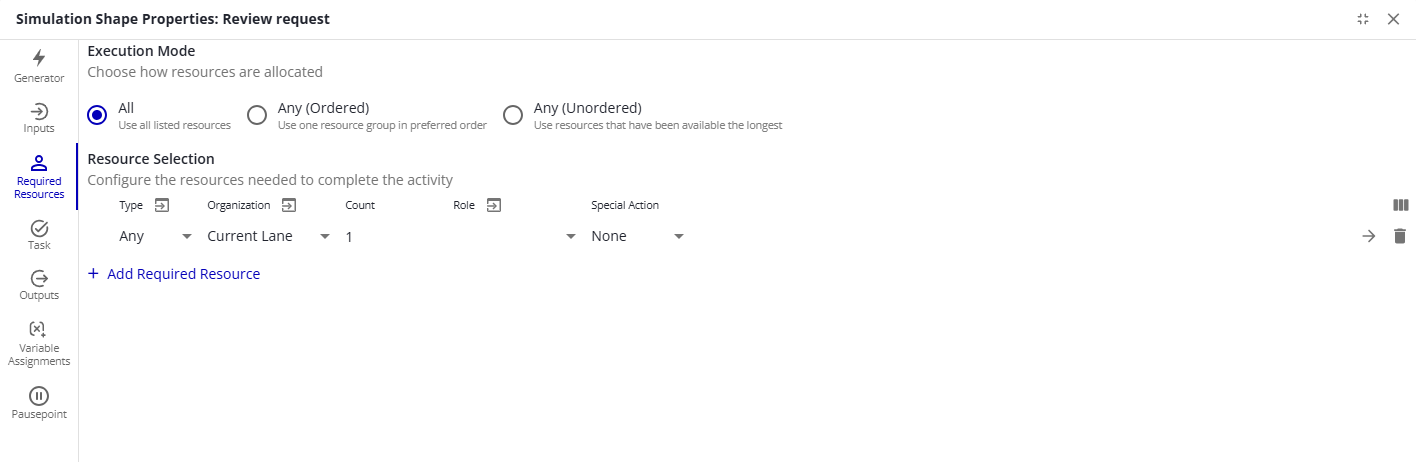
Execution Mode sets how the list is read:
| Execution Mode | Meaning |
|---|---|
| All | Use all listed resources — every row must be acquired (an AND). |
| Any (Ordered) | Use one resource group, in preferred order — try each row from the top and stop at the first group that can be fully acquired (an OR with priority). While acquiring, the simulation may hold resources from several rows; once one group completes, the unused ones release. |
| Any (Unordered) | Use resources that have been available the longest — any listed resource satisfies the request, preferring the least-utilized one (an OR without priority). Rows keep Type, Organization, and Role; the Count — a single total across all rows — and the other shared settings move to the Additional Configurations section below the list. |
Under Resource Selection, each requirement is one row, and a resource is acquired only when it matches everything the row sets — type, organization, and role together. The list shows the Type, Organization, Count, Role, and Special Action columns; the Show/hide columns button at the right end of the header adds Description, Constraint, and Wait. The arrow at the end of a row, tooltip View/Edit Properties, opens the Required Resource Details view with every field of that requirement.
| Column | Description |
|---|---|
| Type | The resource type needed. Any accepts any type from the organization. |
| Organization | Where the resource comes from. Any accepts a resource from any organization. Current Lane, the default, uses the organization matching the lane the shape sits in — see organizations from swimlanes. |
| Count | How many are needed. |
| Role | Only a resource that carries this role is acquired. None, the default, accepts a resource with any roles or none. |
| Description | A free-text note on what the requirement is for. |
| Constraint | An expression a resource must satisfy to be acquired; resource variables are usable here. |
| Special Action | None releases the resource when the task completes. Acquire Only keeps holding it through subsequent activities until a later activityActivity A named step in a process (e.g. "Approve Invoice"). Each event in an event log records one activity occurrence for one case. lists the same resource with Release Only. Not available with Any (Ordered). |
| Wait | Whether this resource stays reserved while the other required resources are still being acquired. When off, other activities can take it in the meantime. |
Task
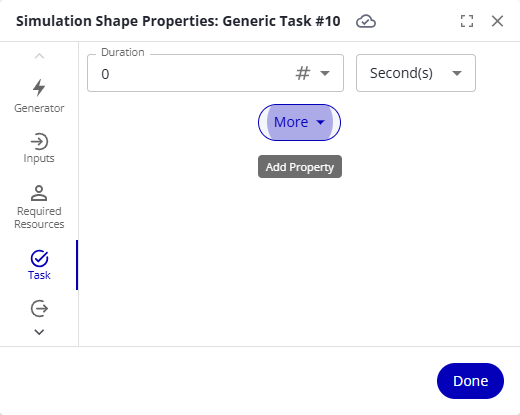
What happens while the case is worked at this shape.
| Property | Description |
|---|---|
| Duration | How long the activityActivity A named step in a process (e.g. "Approve Invoice"). Each event in an event log records one activity occurrence for one case. takes, in seconds, minutes, hours, days, or weeks. Use expression modes for distributions instead of constants. |
| Capacity (optional) | The number of cases that can work at the activityActivity A named step in a process (e.g. "Approve Invoice"). Each event in an event log records one activity occurrence for one case. at the same time; further cases wait for capacity. |
| Task Type (optional) | Work counts the duration as Working Time; Delay counts it as Blocked Time. |
| Schedule (optional) | CasesCase A single instance of a process — for example, one customer order, invoice, or support ticket. An event log groups events by case ID. work at the activityActivity A named step in a process (e.g. "Approve Invoice"). Each event in an event log records one activity occurrence for one case. only while the schedule is in service; otherwise they are inactive. |
| Overtime Behavior (optional) | What resources may do outside their schedule: Don't Start (don't begin work that won't finish in schedule), OK If Started (finish what was started, but don't pick up new work), Always OK (work overtime up to the limit, even on newly arrived cases), Finish Queue (work overtime on cases that arrived before the schedule ended, not on later arrivals). |
| Fixed Cost (optional) | A cost per case completed at the activityActivity A named step in a process (e.g. "Approve Invoice"). Each event in an event log records one activity occurrence for one case.. |
| Repeat Count (optional) | The case executes the activityActivity A named step in a process (e.g. "Approve Invoice"). Each event in an event log records one activity occurrence for one case. this many times in a row. |
| Repeat Condition (optional) | After each completion, the activityActivity A named step in a process (e.g. "Approve Invoice"). Each event in an event log records one activity occurrence for one case. repeats while the condition is true; with Repeat Count set, that count is the maximum. |
| On Completion (optional) | Duplicate makes extra copies (Duplicate Count); Split Into Family turns the case into a family that can be joined later (Family Count); Discard removes the case (Discard CaseCase A single instance of a process — for example, one customer order, invoice, or support ticket. An event log groups events by case ID.) or its whole family (Discard Family CasesCase A single instance of a process — for example, one customer order, invoice, or support ticket. An event log groups events by case ID.), optionally only when Discard Condition is true. |
| Send message (optional) | Sends the chosen message to the Messaging partner when the activityActivity A named step in a process (e.g. "Approve Invoice"). Each event in an event log records one activity occurrence for one case. completes. |
Outputs
What happens when the activityActivity A named step in a process (e.g. "Approve Invoice"). Each event in an event log records one activity occurrence for one case. has more than one outgoing connector line. On the Outputs tab, set Output and — for decisions — the Decision Type.
| Output | Behavior |
|---|---|
| First | The case takes the first connector line it can. |
| Duplicate | The case copies itself, one copy per output path — every path with Split Type: All Paths, or only the paths whose conditions are met with Conditional. |
| Split Into Family | Like Duplicate, but the copies form a case family that can be joined later. |
| Decision | The case takes exactly one path: by random percentage (Decision Type: Percentage) or the first path whose condition is true (Conditional (First)). When every condition is false, the case takes the first path. |
Percentages are statistically random: with small case counts, the observed split can deviate noticeably from the percentages you set — 10 cases through a 50/50 decision can land 7/3.
Variable Assignments
Change variable values as a case passes through the shape. An assignment sits in one of five slots:
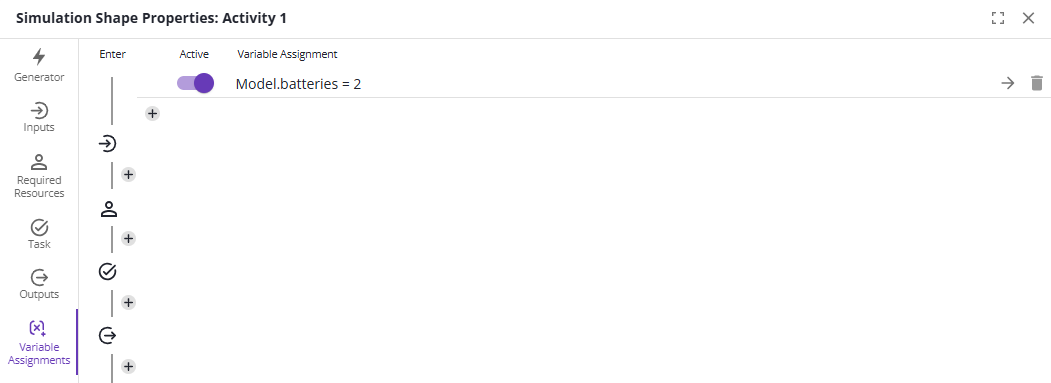
| Slot | When it runs |
|---|---|
| Enter | When the case arrives at the shape. |
| After Input | After the case passes the input gate, if any. |
| Before Task | After required resources are acquired, right before the task starts. |
| After Task | Right after the task finishes. |
| Exit | When the case leaves the shape. |
A connector line has a Variable Assignments tab of its own, with the Enter and Exit slots only. The assignment properties below are the same there.
| Property | Description |
|---|---|
| Active | Whether the assignment runs; inactive assignments are skipped. |
| Scope | Which variable scope to assign in, when the same name exists in several. |
| CaseCase A single instance of a process — for example, one customer order, invoice, or support ticket. An event log groups events by case ID. / Parent / Base | For case variables in a family: CaseCase A single instance of a process — for example, one customer order, invoice, or support ticket. An event log groups events by case ID. changes this case's own value; Parent changes the case it was split from; Base changes the original ancestor case of the family. |
| Variable | The variable to change. |
| Value | The value or expression to assign. |
Assignments can be copied onto other shapes and lines. Point at an assignment and click the overlapping-pages icon, tooltip Copy assignment, or copy a slot's whole list with Copy all assignments. While something is copied, a paste icon, tooltip Paste copied assignments, appears on each slot and adds the copied assignments to it. A warning reports how many pasted assignments use a variable that can't be assigned there at this time.
Pausepoints
A pausepoint pauses a trace-mode run when a case enters the shape.
| Type | Pauses… |
|---|---|
| Always | On every case. |
| Expression True | When the expression evaluates to true. |
| Always, After Count | On every case after the first n cases have entered. |
| Each Count | On every nth case — with a count of 3, the third, sixth, and ninth case, and every third case after. |