Simulation expressions
This reference lists the expression language used throughout simulation properties — the input modes, data types, operators, and every built-in function. An expression is an arithmetic or logical statement that computes a value while the simulation runs; it can use variables, custom functions, and the built-in functions below.
How you enter an expression
Every expression box has a mode, switched with the dropdown at its right edge:

| Mode | Use for |
|---|---|
| Constant | A plain value — a number or true/false. The fastest way to say a task takes exactly 1 minute. |
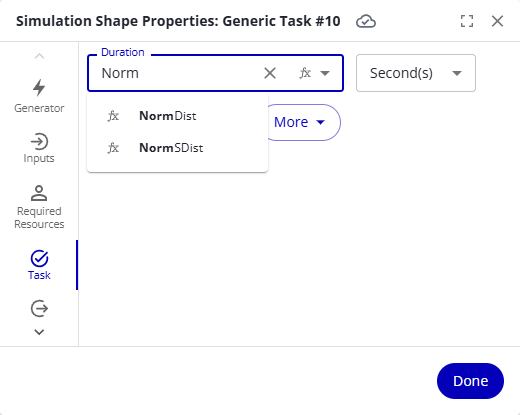
| Expression | The full language: variables, functions, operators. Typing opens autocomplete with the variables in your model and the built-in functions; hovering a suggestion shows what it does, and entering a function's parentheses shows the name and order of its parameters. |
| Between (Uniform) | Two bounds; each evaluation returns a uniformly distributed value between them. |
| Between (Normal) | Two bounds; each evaluation returns a normally distributed value between them — most results near the middle, few at the edges. |
| Fit Data | Derives a distribution from data you supply: pick a column, and a distribution (Uniform, Normal, LogNormal, Exponential, or Weibull) is auto-selected by the lowest AD Score, with the alternatives listed for you to confirm or override. |
| Convert to Scenario Variable | Replaces the constant with a new Scenario variable, so the value can vary per scenario and with Run all scenarios. |
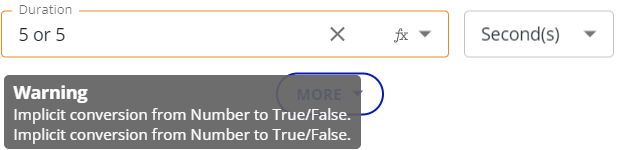
Expressions are checked when you leave the box. A Warning means the expression can still evaluate but may do something unexpected; an Error means it cannot run, and the simulation won't start until you fix it.
Data types
| Type | Values |
|---|---|
| Number | With or without decimals: 5, 10.25. |
| Text | Anything in quotation marks: "High priority". |
| True/false | true or false. |
| Table | A table variable; read one cell as Variable[Row, Column]. |
Operators
Operations are evaluated in the order of this table; use parentheses to override it.
| Operation | Description |
|---|---|
-x | Negates x. |
x ^ y | x raised to the power y. |
x * y | Multiplication. |
x / y | Division. |
x % y | Remainder of x divided by y. |
x + y | Addition. |
x - y | Subtraction. |
x <= y, x < y, x >= y, x > y | Numeric comparison; true or false. |
x != y | True when x and y differ. |
x = y, x == y | True when x and y are equal. |
!x | Turns true into false and false into true. |
x and y | True when both are true. |
x or y | True unless both are false. |
if x then y else z | y when x is true, otherwise z. |
x ? y : z | The same conditional, written compactly. |
Time functions
| Function | Description | Syntax |
|---|---|---|
| ElapsedTime | Returns the time elapsed since the start of the simulation, in seconds. After four simulated hours, ElapsedTime() = 14400. | ElapsedTime() |
| TotalTime | Returns the total time the simulation will run, in seconds. For a four-hour run, TotalTime() = 14400. Throws an error when the run has no set time (for example, it ends by cases completed). | TotalTime() |
Logical functions
| Function | Description | Syntax |
|---|---|---|
| If | Returns a value based on a test. When Test is true, returns the Then value; otherwise the Else value. A numeric Test counts as true when nonzero; a text Test counts as true when not empty. Extra parameter pairs act as ElseIf branches: when the first test is false, the next test is evaluated, and so on. | If(Test,Then,Else) · If(Test,Then,ElseIfTest,Then,…,Else) |
| IsEmpty | Returns 1 when String is "", else 0. | IsEmpty(String) |
| IsNum | Returns 1 when Value is numeric, else 0. | IsNum(Value) |
| Select | Returns a value by integer index: 0 returns Case0, 1 returns Case1, and so on. Out of bounds returns Default. | Select(CaseNum,Default,Case0,…CaseN) |
| Switch | Compares SwitchValue against each Value and returns the paired Result of the first match, or Default when none match. | Switch(SwitchValue,Default,Value1,Result1,…ValueN,ResultN) |
Numeric functions
| Function | Description | Syntax |
|---|---|---|
| Abs | The absolute value: Abs(-4) = 4. | Abs(Num) |
| BatchCount | The number of cases in the calling batch case, or 0 when the calling case isn't a batch. A batch can hold other batches; the optional Depth sets how many additional batch layers are counted into — omitted or 0 counts only the first layer. For a batch holding two batches of 3 cases each, BatchCount() = 2 and BatchCount(1) = 6. | BatchCount(Depth) |
| Ceiling | Rounds up to a whole number: Ceiling(2.5) = 3, Ceiling(-4.37) = -4. | Ceiling(Num) |
| Exp | e (2.71828…) raised to the power Num: Exp(1) = 2.71828. | Exp(Num) |
| Floor | Rounds down to a whole number: Floor(4.3) = 4, Floor(-5.4) = -6. | Floor(Num) |
| Ln | The natural logarithm (inverse of Exp); Num must be positive. Ln(Exp(4)) = 4. | Ln(Num) |
| Log10 | The base-10 logarithm; Num must be positive. | Log10(Num) |
| Max | The larger of the two arguments: Max(4,9) = 9. | Max(Num1, Num2) |
| Min | The smaller of the two arguments: Min(4,9) = 4. | Min(Num1, Num2) |
| Round | Rounds to NumDigits decimal places; 0 rounds to an integer, negative rounds left of the decimal: Round(3.45, 1) = 3.5, Round(11.5,-1) = 10. | Round(Num, NumDigits) |
| Sqrt | The positive square root; Num must be positive. | Sqrt(Num) |
| Trunc | Rounds toward zero to NumDigits decimal places: Trunc(9.765,2) = 9.76, Trunc(-9.765,2) = -9.76. | Trunc(Num, NumDigits) |
Statistical functions
These return random values from distributions — the heart of realistic durations and decisions.
| Function | Description | Syntax |
|---|---|---|
| BernoulliDist | Returns 1 or 0; the argument is how often 1 comes back. BernoulliDist(0.7) returns 1 about 70% of the time. | BernoulliDist(Probability) |
| BetaDist | The cumulative Beta probability density between Min and Max; commonly used to study variation in a percentage across samples. | BetaDist(A,B,Min,Max) |
| Between | A uniformly distributed number between Min and Max, both inclusive — every value equally likely. | Between(Min,Max) |
| BetweenNorm | A normally distributed value between Min and Max — mean and deviation are derived from the bounds, and the result always stays inside them. BetweenNorm(10,20) is usually near 15, seldom 10 or 20. | BetweenNorm(Min,Max) |
| BinomDist | Models drawing from a pool of N items, each drawn successfully with the given probability. | BinomDist(N,Probability) |
| CustomDist | A custom distribution over intervals between 0 and 100. The first parameter is the value of the last interval; the rest are pairs of interval upper bound and value. CustomDist(5, 25, 20, 75, 10): 0–25 → 20, 25–75 → 10, 75–100 → 5. | CustomDist(LastValue, Bound1, Value1, …BoundN, ValueN) |
| ErlangDist | Random values where N is the mean and B the variance; both must be greater than zero and N is an integer. A subset of the Gamma distribution. | ErlangDist(N,B) |
| ExponDist | A value from the Exponential distribution with the given Mean — values cluster near the mean, with occasional large spikes. Computed as -ln(1-x) * Mean for a uniform random x. | ExponDist(Mean) |
| GammaDist | Random values from the Gamma distribution with shape parameters A and B. | GammaDist(A,B) |
| LogNormDist | The logarithmic normal distribution; parameters are the mean and the variance (deviation squared). | LogNormDist(Mean,Variance) |
| NormDist | A normal random variable with the given mean and standard deviation. | NormDist(Mean,Deviation) |
| NormSDist | A standard normal random variable — mean 0, standard deviation 1. Takes no arguments. | NormSDist() |
| PercentTrue | Returns true Num% of the time: PercentTrue(95) is true 95% of the time. | PercentTrue(Num) |
| PercentFalse | Returns false Num% of the time: PercentFalse(95) is false 95% of the time. | PercentFalse(Num) |
| PoissonDist | The limiting form of the Binomial distribution; exponential interarrival times are the same as Poisson arrivals. | PoissonDist(Mean) |
| ProportionalDist | Returns the index i with probability Num(i) divided by the sum of all arguments (up to 12 arguments, all ≥ 0); returns -1 when the sum is 0. | ProportionalDist(Num0,Num1,…) |
| Random | A uniform random real number between 0 and 1. | Random() |
| TriangleDist | A triangle-shaped distribution: Min and Max bound the result, Mode is the most likely value. | TriangleDist(Min,Max,Mode) |
| WeibullDist | The Weibull distribution with parameters A and B (both greater than 0); typically used for reliability analysis. | WeibullDist(A,B) |
String functions
| Function | Description | Syntax |
|---|---|---|
| Compare | CaseCase A single instance of a process — for example, one customer order, invoice, or support ticket. An event log groups events by case ID.-sensitive comparison: -1 when String1 is less than String2, 0 when equal, 1 when greater. | Compare(String1, String2) |
| CompareNoCase | The case-insensitive version of Compare. | CompareNoCase(String1, String2) |
| Concat | Joins two strings: Concat("Hello", "World") = "HelloWorld". | Concat(String1, String2) |
| CropLeft | Searches left to right for the single character CropString and deletes everything up to and including it; returns String unchanged when not found. | CropLeft(String, CropString) |
| CropRight | Searches right to left for the single character CropString and deletes from it to the end; returns String unchanged when not found. | CropRight(String, CropString) |
| Delete | Deletes at most Count characters starting at Index. | Delete(String, Index[, Count = 1]) |
| Find | CaseCase A single instance of a process — for example, one customer order, invoice, or support ticket. An event log groups events by case ID.-sensitive search for SearchString starting at Index; returns the index found, or -1. | Find(String, SearchString[, Index = 0]) |
| FindNoCase | The case-insensitive version of Find. | FindNoCase(String, SearchString[, Index = 0]) |
| FindOneOf | Returns the index of the first character of String that also appears in FindString, or -1. | FindOneOf(String, FindString) |
| GetLength | The length of String. | GetLength(String) |
| Insert | Inserts InsertionString into String at Index. | Insert(String, Index, InsertionString) |
| LeftCount | The leftmost Count characters; the whole string when Count exceeds its length. | LeftCount(String, Count) |
| LeftIndexString | The characters left of the first occurrence of IndexString; String unchanged when not found. | LeftIndexString(String, IndexString) |
| MakeLower | Converts to lowercase. | MakeLower(String) |
| MakeUpper | Converts to uppercase. | MakeUpper(String) |
| MakeReverse | Reverses the character order. | MakeReverse(String) |
| MidIndex | At most Count characters starting at Index. | MidIndex(String, Index[, Count]) |
| MidIndexString | At most Count characters starting at the first occurrence of IndexString; the null string when not found. | MidIndexString(String, IndexString[, Count]) |
| Replace | CaseCase A single instance of a process — for example, one customer order, invoice, or support ticket. An event log groups events by case ID.-sensitive replacement of every OldString with NewString. | Replace(String, OldString, NewString) |
| ReplaceNoCase | The case-insensitive version of Replace. | ReplaceNoCase(String, OldString, NewString) |
| ReverseFind | Searches right to left for the single character SearchString; returns its index, or -1. | ReverseFind(String, SearchString) |
| RightCount | The rightmost Count characters. | RightCount(String, Count) |
| RightIndexString | The characters right of the first occurrence of IndexString; the null string when not found. | RightIndexString(String, IndexString) |
| SetAt | Overwrites String with SetString starting at Index; the result can be longer than String. | SetAt(String, Index, SetString) |
| SpanExcluding | The leading characters of String up to (but excluding) the first character found in SpanString; String unchanged when none is found. | SpanExcluding(String, SpanString) |
| SpanIncluding | The leading characters of String that appear in SpanString, stopping at the first that doesn't; the null string when the first character already doesn't. | SpanIncluding(String, SpanString) |
| ToNumber | Converts a string to a number; leading and trailing spaces are ignored and the null string becomes 0. Numbers pass through unchanged. | ToNumber(Value) |
| TrimLeft | Removes leading spaces. | TrimLeft(String) |
| TrimRight | Removes trailing spaces. | TrimRight(String) |
| ValueToString | Converts a value to a string; strings pass through unchanged. | ValueToString(Value) |
Notes / constraints
- The autocomplete list is the authoritative function catalog for your release: anything it offers is available, its tooltips match the descriptions above, and typing inside a function's parentheses shows each parameter's name and position.
- Scoring function expressions evaluate after the run ends, so they can additionally read the run's statistics through the
Statisticsscope.

Related
- Simulation properties — variables, custom functions, scenarios
- Simulation shape properties — where expressions are used
- Use table variables