BPMN shape behavior in simulation
The Business Process Model and Notation (BPMNBPMN An ISO/OMG standard graphical notation for modeling business processes. Process360 Live uses BPMN 2.0 for design and simulation artifacts.) specification defines exact behavior for its Flow Objects. When you simulate a BPMNBPMN An ISO/OMG standard graphical notation for modeling business processes. Process360 Live uses BPMN 2.0 for design and simulation artifacts. diagram, each gateway's simulation shape properties must match that defined behavior — otherwise the model runs, but not the process you drew. Placing a shape usually sets the recommended behavior for common Flow Objects automatically; this page explains what to check.
Overview
Gateways control where a case (the BPMNBPMN An ISO/OMG standard graphical notation for modeling business processes. Process360 Live uses BPMN 2.0 for design and simulation artifacts. token) flows next. Treat them like balanced parentheses: a Parallel Gateway that splits flow should be matched by a Parallel Gateway that re-synchronizes it. The three common gateways:
- Exclusive — exactly one path; an OR. The everyday decision point.
- Parallel — all paths; an AND. Starts and re-synchronizes parallel work.
- Inclusive — one or more paths; an AND/OR. A decision where several branches can apply at once.
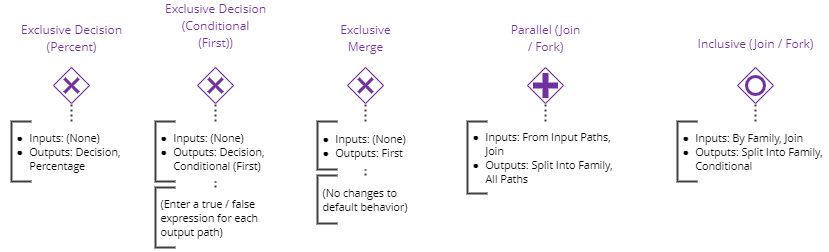
Exclusive Gateway

Inputs: no gate behavior. BPMNBPMN An ISO/OMG standard graphical notation for modeling business processes. Process360 Live uses BPMN 2.0 for design and simulation artifacts. 2.0 expects each arriving token to pass straight through, so the default — no Input Gate — is correct.

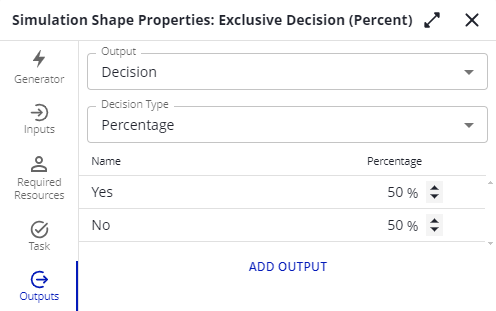
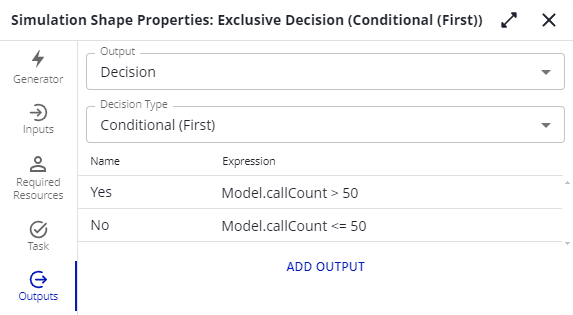
Outputs: set Output to Decision, then choose:
-
Percentage — each path gets a likelihood; the percentages add up to 100%.
-
Conditional (First) — you write a condition per path, and the case follows the first one that is true. Use this for rules rather than probabilities.
One caution: if the outputs of an Exclusive Gateway lead into a Parallel Gateway, merge them with another Exclusive Gateway first. A Parallel Gateway's inputs wait for a token from every incoming line, so routing two exclusive branches straight into it deadlocks the flow — only one branch will ever deliver a token.
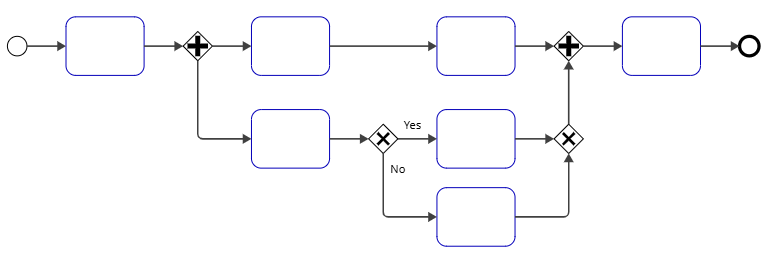
Parallel Gateway

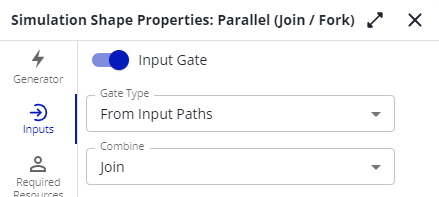
Inputs: a token must arrive from each and every incoming sequence flow before the gateway triggers; one token then proceeds. Turn on Input Gate with Gate Type: From Input Paths and Combine: Join, so the family members re-merge into one token.
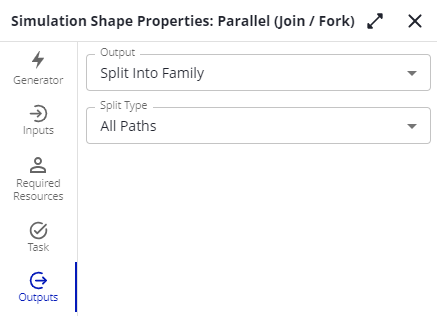
Outputs: one token is created for each and every outgoing sequence flow — Split Into Family across All Paths, so the parallel branches can be re-synchronized later.
Inclusive Gateway

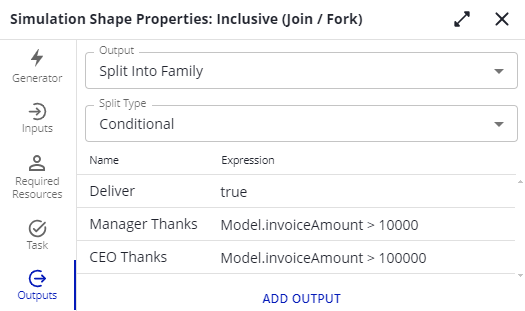
Use an Inclusive Gateway when more than one condition can be true at once. For example: every order ships, large orders also get a manager's thank-you card, and very large orders get the CEO's too.
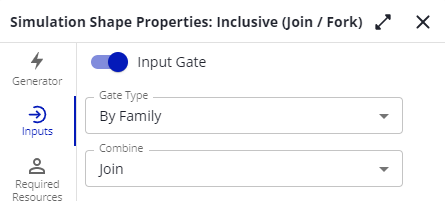
Inputs: all paths that can deliver a token must deliver one before the gateway triggers — typically matching an Inclusive Gateway earlier in the flow. Turn on Input Gate with Gate Type: By Family and Combine: Join.
Outputs: Split Into Family with Split Type: Conditional — every path whose condition is true gets a family member.
Boundary events
Boundary events are not supported in simulation; the simulator reports a problem for them. For a Timer Boundary Event, model the equivalent with parallel paths:
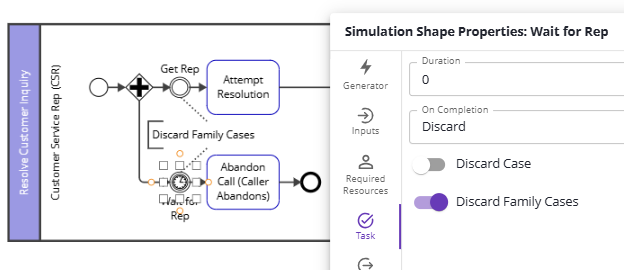
- Split the flow with a Parallel Gateway into the normal path and a path leading to a timer event.
- At the end of each path, discard the other path's token — use On Completion → Discard with Discard Family CasesCase A single instance of a process — for example, one customer order, invoice, or support ticket. An event log groups events by case ID. on an event or activityActivity A named step in a process (e.g. "Approve Invoice"). Each event in an event log records one activity occurrence for one case., or a Terminate event, so the sibling family token is removed but not the case itself.
- Continue routing after whichever path completed first.
Only one path completes, exactly as a boundary timer would behave. This pattern ships as a sample diagram (Resolve Call).