20.4.0 Cloud Release Highlights
Date: October 13, 2026
Pia - New Diagram Layout Is Now General Access
The updated layout for Pia-created diagrams, introduced in 20.3.0 as Early Access, is now General Access: it's on out of the box, and an administrator can still switch New Diagram Layout for Pia off for a time under AI Settings.
Read more: Create a diagram with Pia
Pia - Vertical Diagram Layouts
Pia can now draft a diagram vertically: a template built around vertical pools starts the conversation in a vertical layout, asking Pia for one does the same, and the orientation sticks for the rest of the conversation.
Read more: Create a diagram with Pia
Pia - Activity Sizing Settings
New Sizing settings control how Pia sizes the activities it draws — their starting size, whether overflowing text grows the shape or shrinks the text, and an option to give every activityActivity A named step in a process (e.g. "Approve Invoice"). Each event in an event log records one activity occurrence for one case. the size of the largest one. Changes apply to the diagram immediately and are remembered for your future Pia diagrams.
Read more: Create a diagram with Pia
Pia - Persistent Chat and New Conversation
A conversation with Pia now survives a page refresh, and the new New conversation control clears the chat — and the diagram preview, when there is one — for a fresh start.
Read more: Create a diagram with Pia
Search - New Search Experience
Search is rebuilt on a new engine. Results come back ranked by relevance and grouped by repository. Filters for repositories, object types, and versions narrow the results without rewriting the search term, and bulk operations act on everything you found at once. An administrator turns on the New Search Early Access feature to use it.
Once New Search is turned on, it first has to read through each repository before it can search it. How long that takes depends on the size of your repositories. Until a repository is ready, a search may not find all of its items. The full search results page shows when that's the case — the repository is marked Indexing with its progress — and offers the legacy search in the meantime.
Read more: Search the platform
Search - Dedicated Search Gadget for Dashboards
A dashboardDashboard A configurable view in Process360 Live that aggregates KPIs, charts, and filters across one or more processes for stakeholders to monitor performance. can now include a Search gadget: the full search experience, filters included, directly on the dashboardDashboard A configurable view in Process360 Live that aggregates KPIs, charts, and filters across one or more processes for stakeholders to monitor performance., so readers find objects without leaving it.
Read more: Dashboard gadgets
Risk Management - Business Impact Analysis
Business Impact Analysis (BIA) arrives as a risk data type for business continuity management. Instead of a single impact and likelihood estimate, a BIA risk records how the impact of a disruption grows over time and calculates whether the assessed object is business-critical, with each assessment moving through a governed lifecycle that ends in a recorded board decision. Reports show BIA assessments through the currentRiskDataBia IQL property. An administrator turns on the BIA Risk Data Type Early Access feature to use it.
Read more: BIA risks
How to enable Early Access features
-
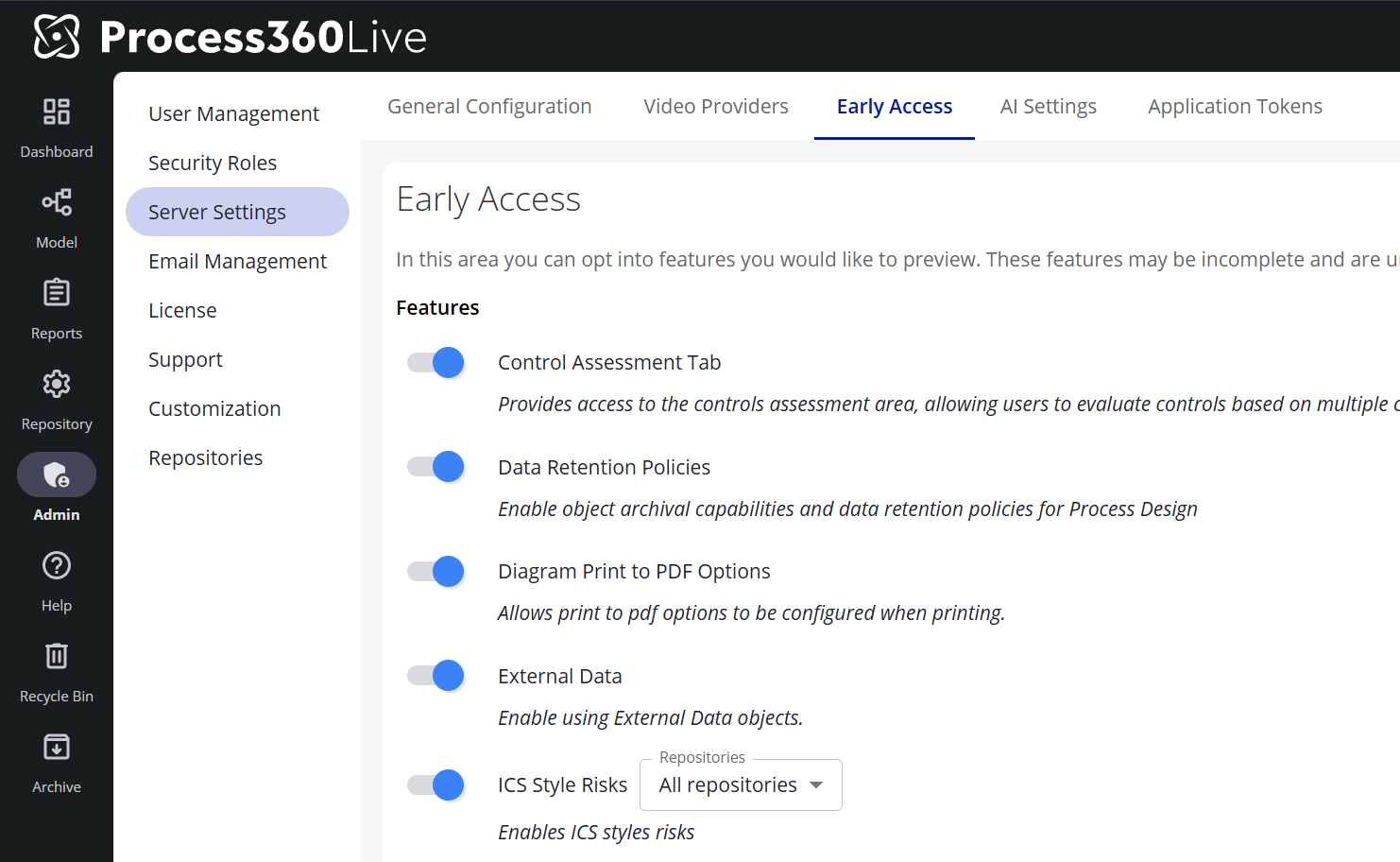
Go to Admin → Server Settings
-
Navigate to the Early Access tab. AI-related Early Access features (such as Pia Diagram Creation) live on the adjacent AI Settings tab and are toggled the same way.
-
Toggle the features you would like to enable
Note: Features with a ℹ️ icon are in General Access. These features are fully released; customers are provided a temporary window to disable these features to perform internal training and communications before the feature is permanently enabled.
Simulation - BatchCount Function
The new BatchCount expression function returns how many cases the calling batch holds, with an optional depth that counts into batches nested inside it.
Read more: Simulation expressions
Simulation - Copy and Paste Assignments
Variable assignments can now be copied and pasted between simulation elements — a single assignment or all of an element's assignments at once.
Read more: Simulation shape properties
Governance - Start Sessions in View Approved Only Mode
A new server setting, View Approved Only mode, decides how the mode behaves for everyone: available and off at sign-in, available and on at sign-in, or disabled entirely. Starting every session in View Approved Only means readers see approved content by default and switch to drafts only when they mean to.
Read more: Server settings
Governance - Required Comments When Changing the Current Approved Version
A repository's version policies can now require a comment whenever someone changes an item's current approved status, the same way they can for check-ins, reviews, and approvals. The comment is kept in the item's history, so the reason for the change stays with the record.
Read more: Set repository policies
Reporting - Rename Report Columns
A report creator can now rename any column heading — relationship columns such as Described By included — so a report reads in your organization's terminology instead of the built-in field names.
Read more: View and refine a report
Reporting - Report on Links in Summary, Purpose, and Instructions
Web links embedded in an item's Summary, Purpose, or Instructions are now recorded as that item's links, so reports can surface them through the linkedUrl IQL property. Links that already exist in your content are picked up automatically.
Read more: IQL query properties
Reporting - Updated Reporting UI for Everyone
The updated interface for defining and editing narratives and other report types — previously behind the New Reporting UI Early Access toggle — is now the standard experience for everyone, and the toggle is gone.
Read more: Reporting
Enterprise Model - External Agents Can Support Business Services
A Business Service can now have an External Agent among its Supported By relationships, so a service's dependence on vendors, partners, and other outside parties can be modeled directly.
Read more: Object relationships
Diagramming - Format Painter Copies Rich Text Settings
The Format Painter now copies a shape's rich text settings along with its other formatting, whether the text was styled through the Styles panel or on the shape itself.
Read more: Shape numbering and style