18.5.0 Cloud Release Highlights
Features
All features released in 18.5.0 are part of Early Access.
Early Access
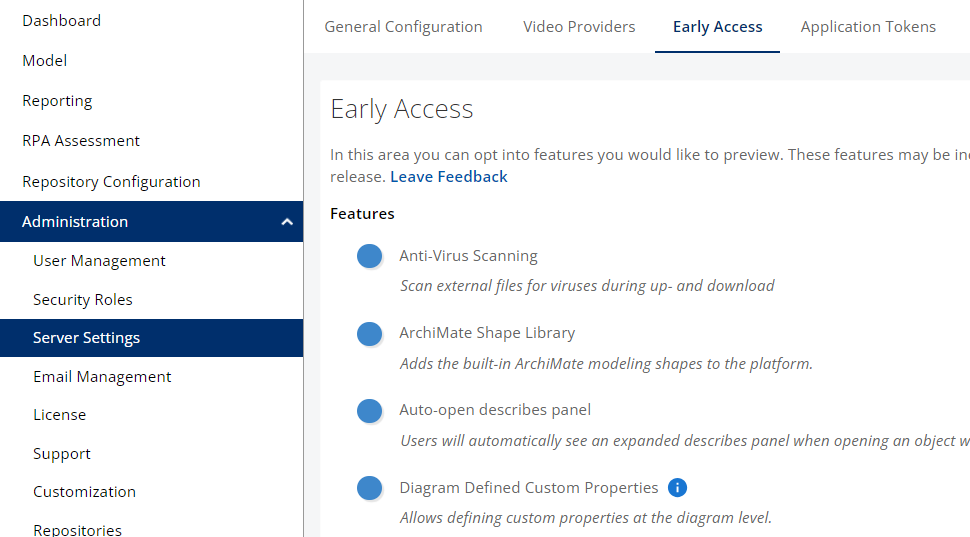
How to enable Early Access features
How to enable Early Access features
|  |
New Diagram Experience
The New Diagram Experience Early Access feature is now stable and will launch in May with v19.0. If you turn this feature on and have feedback on where we are headed we would like to hear from you. Please submit a ticket to the Service Desk to do so.
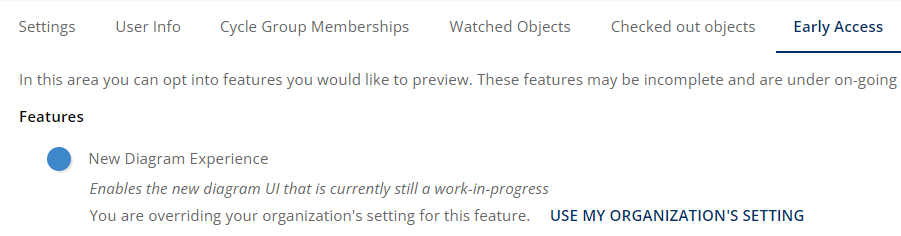
This feature may be turned on or off by users individually while the feature is in Early Access, separately from the Server Setting. Navigate to: Profile Picture in top right → My Profile → Early Access and toggle New Diagram Experience
Note: This update changes left and right mouse button functions when the New Diagram Experience Early Access feature is enabled.
-
Left click hold mouse dragging does lasso selecting
-
Right click and drag does panning
Process Simulation
Simulations may be run on diagrams of any type. Use Simulations to improve decision confidence, ask “what if?” style questions, and forecast business outcomes that incorporate all available data. Process360 LiveProcess360 Live iGrafx's cloud platform for end-to-end process management — combining process design, mining, simulation, and automation in a single environment. Simulation is a Discrete Event simulation engine that tracks and models every event at every step in the process for the specified simulation duration.
ℹ️ Simulation looks best with the New Diagram Experience enabled. It is recommended, though not required, to enable New Diagram Experience when planning to use Process SimulationProcess Simulation Running a designed process model against scenarios (volumes, resources, durations) to predict performance before making real-world changes..
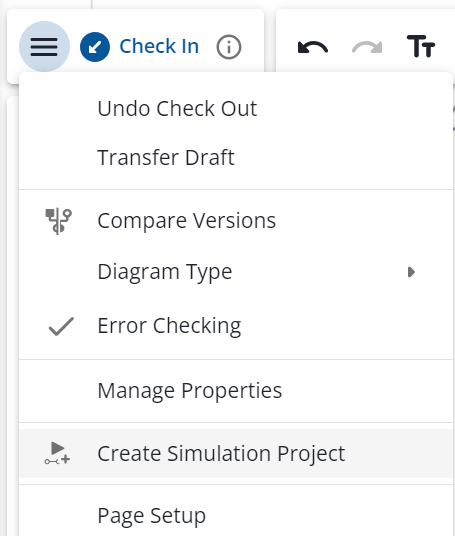
To get started with Simulation, select a Diagram, open the hamburger menu, and select “ Create Simulation Project”
Learn more about Process SimulationProcess Simulation Running a designed process model against scenarios (volumes, resources, durations) to predict performance before making real-world changes. here.
Note: Process SimulationProcess Simulation Running a designed process model against scenarios (volumes, resources, durations) to predict performance before making real-world changes. is entering Early Access and has many more features planned for development before releasing to General Access.
Visio Import - Now Cloud Only
Visio Import in Process360 LiveProcess360 Live iGrafx's cloud platform for end-to-end process management — combining process design, mining, simulation, and automation in a single environment. is improved, with particular improvements handling custom shapes in Visio diagrams. Visio import has a set of documented limitations.
Visio Import in Process360 LiveProcess360 Live iGrafx's cloud platform for end-to-end process management — combining process design, mining, simulation, and automation in a single environment. is now a Cloud Only feature. This change is a result of Visio Import using a Cloud Service to assist in the Visio Import process.
Visual Updates
List of minor visual updates made in 18.5.0
The only minor visual updates made in 18.5.0 are to Early Access features.