Server settings
This reference lists what an administrator can set under Admin → Server Settings, tab by tab. Changing anything here requires the Edit Server Settings server permission (the Default Landing Page alone also accepts Can Customize).
General Configuration
| Setting | What it does |
|---|---|
| Site URL | The platform's own address, used to build working links in notification emails. |
| Tab Name Prefix | Text placed at the start of every browser tab title. |
| Proxy server and port (servername:port) | A forward proxy for the platform's outgoing connections, where your network requires one. On-premises only. |
| Default Landing Page | The page users see right after sign-in — see Set the landing page and default dashboard. |
| Default DashboardDashboard A configurable view in Process360 Live that aggregates KPIs, charts, and filters across one or more processes for stakeholders to monitor performance. | The dashboardDashboard A configurable view in Process360 Live that aggregates KPIs, charts, and filters across one or more processes for stakeholders to monitor performance. for users without a personal default — see Set the landing page and default dashboard. |
| Email domain allowlist (comma separated and without @ symbol) | Restricts who can use the platform: with a list set, only accounts whose username ends in one of those domains get in — anyone else is blocked with User not allowed, whatever their credentials. Leave it empty to allow every domain. The list is checked on every request, not only at sign-in, so narrowing it signs out anyone who no longer matches. A username with no @ in it is blocked whenever the list isn't empty. |
| Default Language | The UI language for users who haven't picked one. |
| Allow new users to select UI language on first login | Asks each new user for their language the first time they sign in. |
| View Approved Only mode | How View Approved Only behaves for everyone: Available, off at login — users turn the mode on when they need it; Available, on at login — every session starts in the mode for users licensed to see unapproved content; Disabled — the mode is withdrawn from the user menu, and a session that had it on drops it. |
| Default breadcrumb behavior for new users | Whether new users' breadcrumb shows an item's ancestors or their recent history. |
| Select the time zone to use for date display | The default time zone; users can override it in their profile. |
| Print to PDF → Autodetect fonts for PDF printing | Font handling for PDF output. On-premises only. |
| Enable antivirus → Scan files on upload and download | Virus-scans external files as background jobs — see Antivirus scanning. Cloud only. |
Video Providers
The oEmbed providers whose videos authors can embed — in Video dashboard gadgets and rich text. Each provider takes a name, an endpoint URL, and the URL patterns it serves.
Early Access
The feature toggles for upcoming features, each with a short description — see Early Access and General Access for what the stages mean.
AI Settings
The switches for the platform's Pia features (cloud only): Pia - Process Intelligence Assistant (for Diagram Creation), Pia Diagram Insights (which also enables Pia diagram translations), Pia for Reports and Search, and New Diagram Layout for Pia, which lays out Pia-drafted diagrams with an updated layout service that optimizes for readability. While diagram creation is switched on, the page also shows whether Document Ingestion is available, which comes with the Pia Plus license.
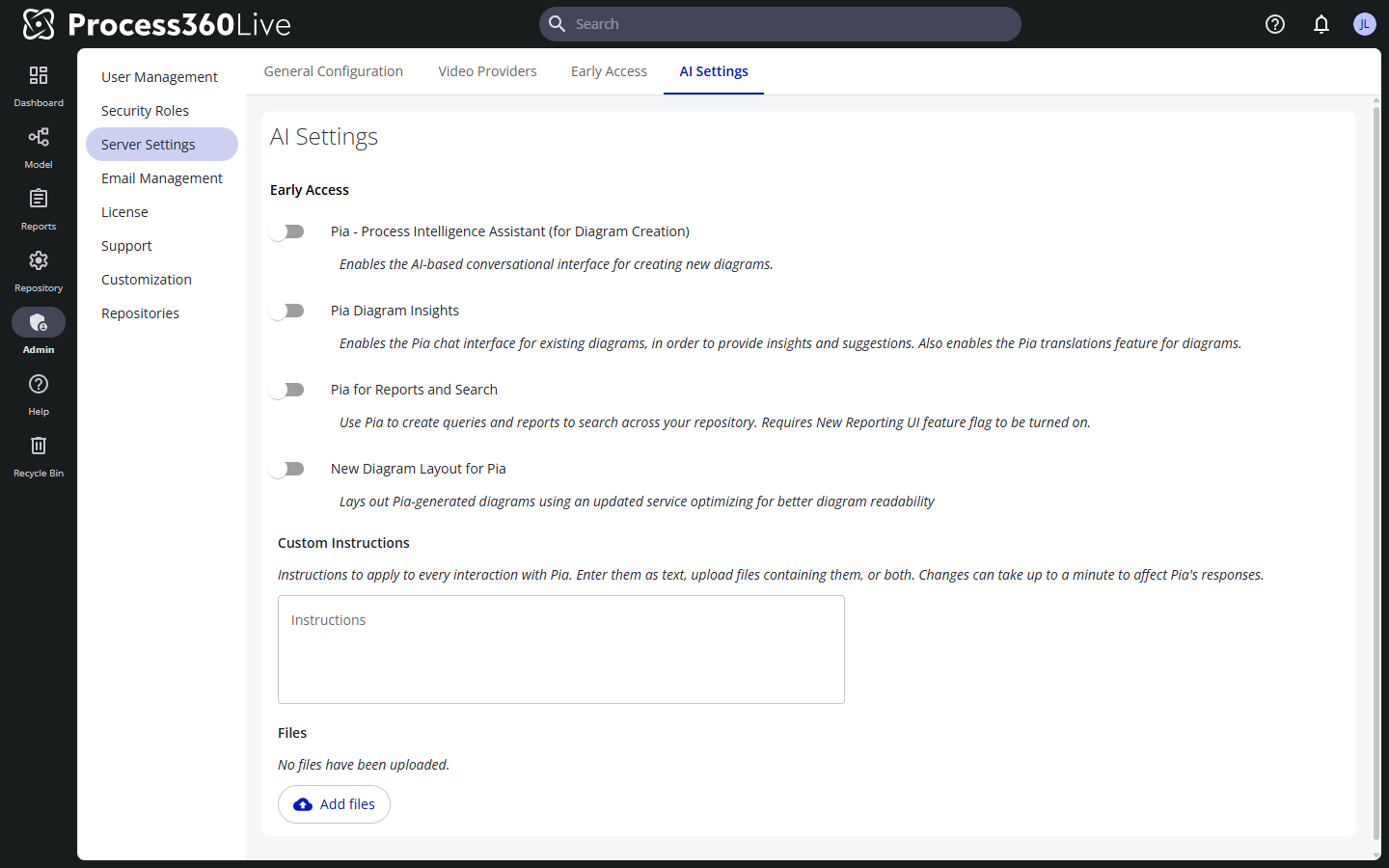
Custom Instructions
Standing instructions Pia applies to every interaction, set once for the whole platform (cloud only). Type them into the Instructions box, add files under Add files, or do both.
The Instructions box saves when you click outside it, not when you press Enter. While an edit is unsaved, the page shows Unsaved changes — click outside the box to save.
A file has to be a text, office, or PDF document:
- Text and data —
.md,.txt,.csv,.tsv,.json,.xml,.yaml,.yml,.html,.htm,.log - Office documents —
.docx,.xlsx,.pptx,.odt,.ods,.odp,.rtf - PDF —
.pdf
What can be stored is capped:
- 1,000,000 bytes for a single file, and the same for the instructions text
- 5,000,000 bytes for the text and the files together
- 20 files
- 255 characters for a file name
Uploading a file whose name matches one already stored replaces it — the names are compared without regard to capitalization, and the page names the file that was replaced. A file Pia can read no text from is still stored, and the upload reports that it won't affect Pia's responses.
To get a copy of a stored file, click the downward-arrow icon at the right of its row, tooltip Download.
To remove a stored file, click the trash-can icon at the right of its row, tooltip Remove, and confirm in the Remove custom instructions file dialog. Pia stops using that file's instructions.
A change to the instructions text, or to the files, can take up to a minute to affect Pia's responses.
Saving the text, uploading a file, and removing a file are each recorded as an audit event in the SETTINGS category, so the audit data shows who changed the instructions and when. File names appear masked, with only their first and last three characters and the extension in clear, and the instructions text is never recorded.