ADFS auto-creation of authenticated users
The platform can create authenticated users automatically the first time they sign in via SSOSSO An authentication scheme that lets users sign in once with an identity provider and access Process360 Live without re-entering credentials., so you don't have to add them by hand first. These steps cover the on-premises SAML2-with-ADFS specifics — discovering the attribute names ADFS sends and restarting the service; with adjustments they apply to other identity providers. For cloud, see Auto-create users on first sign-in.
When auto-creation is configured, an authenticated user not yet in the platform's user table is created during sign-in, and a corresponding entry appears in Administration → User Management. If the user already exists, the existing user is matched. New users are placed in the Users group — add that group first, and give it a default role, or auto-created users get no permissions and may see a permission message.
Prerequisites
- A working SAML2 ADFS setup.
- The Users group created in the platform, with an appropriate default role.
Steps
-
Complete the Microsoft ADFS Server setup.
-
In Administration → User Management → SAMLSAML An XML-based standard for exchanging authentication and authorization data between an identity provider and a service provider. Process360 Live supports SAML 2.0 for SSO., select Automatically create authenticated users to enable it.
-
Determine the SAMLSAML An XML-based standard for exchanging authentication and authorization data between an identity provider and a service provider. Process360 Live supports SAML 2.0 for SSO. attribute names (claim type URIs) ADFS sends for first name, last name, and email — directly or indirectly. A claim type URI is the standard identifier for an attribute, such as
http://schemas.xmlsoap.org/ws/2005/05/identity/claims/givenname; on the ADFS side, a claim rule issues these from your directory.-
Direct — ask your ADFS team for the claim type URIs. On the ADFS side they're issued by a claim rule set on the Edit Rule → LDAP Attribute tab.
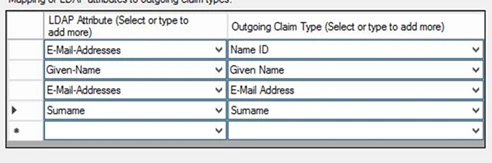
The resulting ADFS claim rule looks like:
c:[Type == "http://schemas.microsoft.com/ws/2008/06/identity/claims/windowsaccountname", Issuer == "AD AUTHORITY"]=> issue(store = "Active Directory", types = ("http://schemas.xmlsoap.org/ws/2005/05/identity/claims/nameidentifier", "http://schemas.xmlsoap.org/ws/2005/05/identity/claims/givenname", "http://schemas.xmlsoap.org/ws/2005/05/identity/claims/emailaddress", "http://schemas.xmlsoap.org/ws/2005/05/identity/claims/surname"), query = ";sAMAccountName,givenName,mail,sn;{0}", param = c.Value); -
Indirect — read the attribute names from the platform's logs. In Administration → Support → Logging Settings, set
DEBUG, disable Log All Classes, select Custom, and enterorg.springframework.security.saml2;org.opensaml;PROTOCOL_MESSAGE— on versions before 20.0.0, useorg.springframework.security.samlin place oforg.springframework.security.saml2. Have a user sign in, then read the assertion in the System Log. If you can't find the attribute names, they may be encrypted — use the direct method. An example assertion:<Subject><NameID Format="urn:oasis:names:tc:SAML:1.1:nameid-format:emailAddress">user@igrafx.com</NameID><SubjectConfirmation Method="urn:oasis:names:tc:SAML:2.0:cm:bearer"><SubjectConfirmationData InResponseTo="aba86j6216if75f4g52jfidjf0ddej" NotOnOrAfter="2018-02-06T15:58:42.048Z" Recipient="https://www.igrafx.com:443/saml/SSO"/></SubjectConfirmation></Subject><AttributeStatement><Attribute Name="http://schemas.xmlsoap.org/ws/2005/05/identity/claims/surname"><AttributeValue>LastName</AttributeValue></Attribute><Attribute Name="http://schemas.xmlsoap.org/ws/2005/05/identity/claims/givenname"><AttributeValue>FirstName</AttributeValue></Attribute></AttributeStatement>
-
-
In Administration → User Management → SAMLSAML An XML-based standard for exchanging authentication and authorization data between an identity provider and a service provider. Process360 Live supports SAML 2.0 for SSO., enter the claim type URIs for each attribute:
First name http://schemas.xmlsoap.org/ws/2005/05/identity/claims/givennameLast name http://schemas.xmlsoap.org/ws/2005/05/identity/claims/surnameEmail http://schemas.xmlsoap.org/ws/2005/05/identity/claims/emailaddress -
Restart the service.