SAML2 authentication (ADFS, Okta, Centrify)
Profile: samlsecurity
SAMLSAML An XML-based standard for exchanging authentication and authorization data between an identity provider and a service provider. Process360 Live supports SAML 2.0 for SSO. (Security Assertion Markup Language) provides single sign-on between service providers (applications that require authentication) and identity providers (applications that provide it). The iGrafx platform is the service provider (SP); your ADFS server, Okta instance, or similar is the identity provider (IdP).
Prerequisites
- HTTPS everywhere. SAMLSAML An XML-based standard for exchanging authentication and authorization data between an identity provider and a service provider. Process360 Live supports SAML 2.0 for SSO. works only if all SPs and IdPs are reachable over
https. Set up SSL on your instance and make sure your IdP useshttpstoo. - Users present in the platform. Every IdP-known user who needs access must already exist in the platform — add them by connecting Active Directory or by importing them (including via the REST API). A user who authenticates via SAMLSAML An XML-based standard for exchanging authentication and authorization data between an identity provider and a service provider. Process360 Live supports SAML 2.0 for SSO. but isn't known to the platform gets a permission-denied error.
Steps
Set up a SAML2 keystore
A samlKeystore.jks file in your base directory signs and verifies IdP and SP metadata and SSL connections. It's loaded once at service startup.
-
Copy
openjdk-11.0.x\lib\security\cacertsfrom your installation directory toigrafxdata\samlKeystore.jksto bootstrap the keystore with the existing Java certificate store. Usechangeitfor the keystore password when prompted (you can change it later). -
Then either:
-
Add your production-ready private key with the Java
keytool— see the Spring Security SAML key-management docs; or -
Create a self-signed certificate (
keytoolis in your Java installation'sbindirectory):keytool -genkey -keyalg RSA -alias %KEYALIAS% -keystore samlKeystore.jks -keypass %KEYPASS% -validity 360 -keysize 2048Replace
%KEYALIAS%and%KEYPASS%with an alias and password for your private key. The command sets the key password and then prompts for a store password.
-
-
Copy
samlKeystore.jksinto your base directory. -
In
igrafx.propertiesin the base directory, set (uncomment or add) these, with your keystore password, the private-key alias, and the key password:igrafx.usercentral.saml.keystorepass=changeitigrafx.usercentral.saml.defaultalias=YOUR_KEY_ALIASigrafx.usercentral.saml.defaultpassword=YOUR_KEY_PASSWORD -
Restart the platform service. The SP metadata you download later is signed with this private key — if you've already uploaded SP metadata to an IdP, update it.
Set up the identity provider
Pick your IdP. Each procedure assumes you've completed the keystore setup above and activated the samlsecurity profile (see Configuring authentication).
Azure Active Directory
-
Complete the SAML keystore setup, starting from the existing
cacertskeystore rather than an empty one. -
Activate the
samlsecurityprofile and restart the platform. -
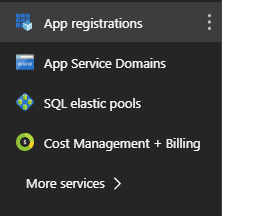
Sign in to the Azure portal and open App Registration (use More services if it's not shown).

-
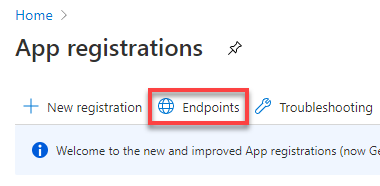
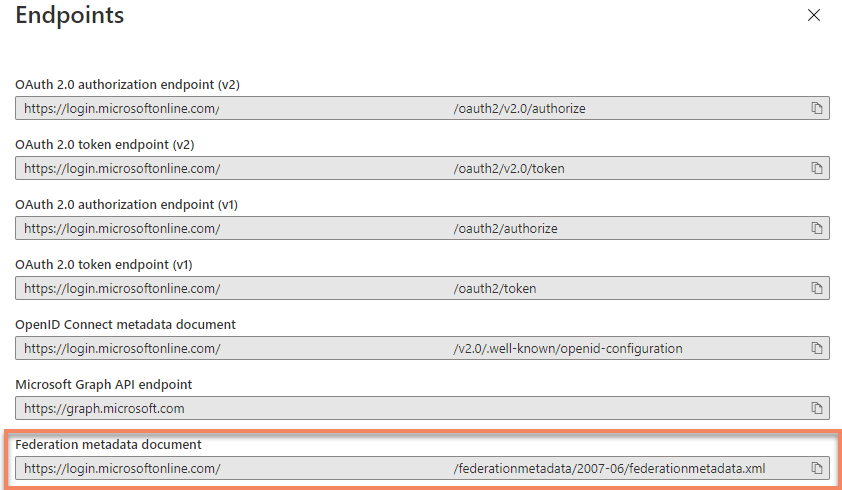
Select Endpoints in the App registrations header and copy the top URL (the metadata file).
-
In the platform, go to Administration → User Management → SAMLSAML An XML-based standard for exchanging authentication and authorization data between an identity provider and a service provider. Process360 Live supports SAML 2.0 for SSO., select Update Identity Provider Metadata, and add the metadata URL. Set the Name ID policy to Email.
-
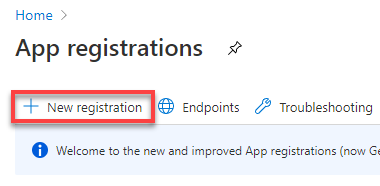
Back in Azure, close the endpoint blade and select New registration.
-
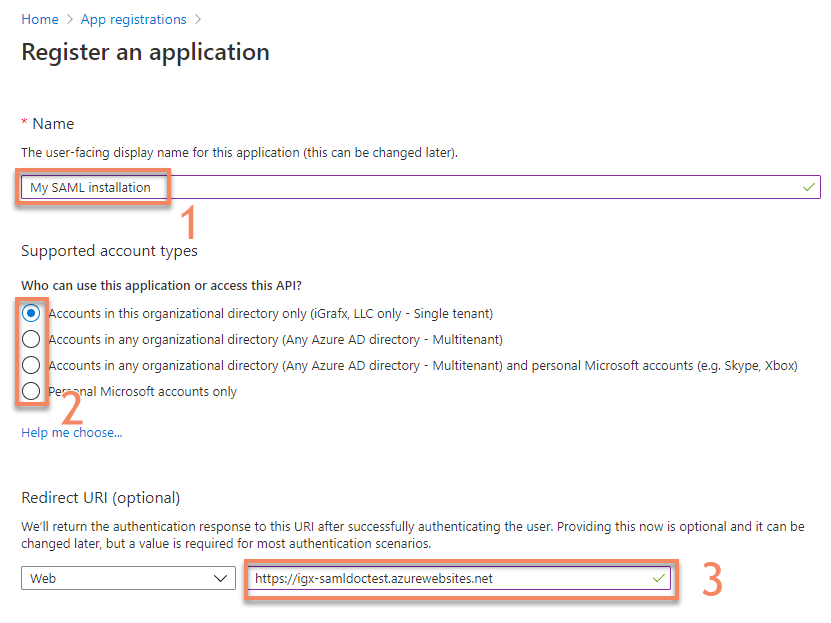
Enter a name, select the account types that can sign in, and enter the HTTPS URL where your installation is available, then Register.
-
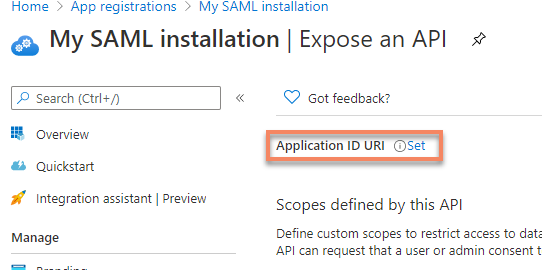
On the new registration, select Add an Application ID URI.

-
Select Set to add a new Application ID URI.
-
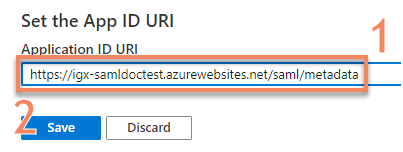
Copy the autogenerated App ID URI (or set your own) and Save.
-
Set the App ID URI in
igrafx.properties, then restart the platform:igrafx.usercentral.saml.entityId=YOUR_APP_ID_URI
Microsoft ADFS Server
- Complete the SAML keystore setup.
- Activate the
samlsecurityprofile and restart the platform. - Sign in over HTTPS and go to Administration → User Management → SAMLSAML An XML-based standard for exchanging authentication and authorization data between an identity provider and a service provider. Process360 Live supports SAML 2.0 for SSO..
- Click Download Service Provider Metadata and save
spring_saml_metadata.xml. - In the AD FS 2.0 Management Console, select Add Relying Party Trust (you may need to install Active Directory Federation Services).
- Select Import data about the relying party from a file and select
spring_saml_metadata.xml, then Next. You can ignore a warning that some metadata content isn't supported. - Enter a display name and continue. Leave multi-factor authentication unconfigured, and Permit all users to access this relying party.
- On Ready to Add Trust, confirm the Endpoints tab has multiple endpoints — if not, regenerate your metadata with HTTPS URLs.
- Leave Open the Edit Claim Rules dialog checked and finish.
- Select Add Rule → Send LDAP Attributes as Claims → Next. Name the rule
NameID, choose Active Directory as the attribute store, E-Mail-Addresses as the LDAP attribute, and Name ID as the outgoing claim type. Finish and confirm. - Download your IdP metadata from
https://YOUR_ADFS_SERVER/FederationMetadata/2007-06/FederationMetadata.xml. - In Administration → User Management → SAMLSAML An XML-based standard for exchanging authentication and authorization data between an identity provider and a service provider. Process360 Live supports SAML 2.0 for SSO., select Update Identity Provider Metadata and upload it.
- Download the JCE Unlimited policy and place the two JAR files in your JRE/JDK
lib/securitydirectory (see JCE Unlimited policy). - Restart the platform. You should now be forwarded to the ADFS login page.
To force SHA1 (SHA256 still supports SHA1 trusts unless your devices don't support SHA256), add:
igrafx.usercentral.saml.signatureAlgorithm=SHA1
If you see "Bad Request - Request Too Long" opening the platform with ADFS, clear the browser cookie and sign in again.
For automatically creating authenticated users, see ADFS auto-creation of authenticated users.
Okta
-
Complete the SAML keystore setup, activate the
samlsecurityprofile, and restart the platform. -
Go to Administration → User Management → SAMLSAML An XML-based standard for exchanging authentication and authorization data between an identity provider and a service provider. Process360 Live supports SAML 2.0 for SSO., click Download Service Provider Metadata, and save
spring_saml_metadata.xml. -
In Okta as an administrator, open Applications → Create New App, select SAMLSAML An XML-based standard for exchanging authentication and authorization data between an identity provider and a service provider. Process360 Live supports SAML 2.0 for SSO. 2.0, and Create.
-
Name the app (for example
iGrafx) and continue, then configure SAMLSAML An XML-based standard for exchanging authentication and authorization data between an identity provider and a service provider. Process360 Live supports SAML 2.0 for SSO.:Setting Value Single Sign-on URL https://yourinstance/saml/SSOAudience URI (SP Entity ID) The value from the <md:EntityDescriptor entityID="???">attribute of the downloadedspring_saml_metadata.xmlRelay State Leave blank Name ID format Unspecified Application username Any available option — make sure the usernames map to login names that exist in the platform -
Finish creating the app. Optionally, configure custom username mappings on the app's People page.
-
On the app's Sign On tab, download (or copy the URL of) the Okta IdP metadata.
-
In Administration → User Management → SAMLSAML An XML-based standard for exchanging authentication and authorization data between an identity provider and a service provider. Process360 Live supports SAML 2.0 for SSO., select Update Identity Provider Metadata and provide the URL or file.
-
Test by going to your application's base URL and selecting Sign-in via SSOSSO An authentication scheme that lets users sign in once with an identity provider and access Process360 Live without re-entering credentials..
-
Restart the platform to disable the login form. You should now be forwarded to the Okta login page.
Centrify
- Complete the SAML keystore setup and activate the
samlsecurityprofile. - In
igrafx.properties, set the entity ID (see Other options) tohttps://yourinstance/saml/metadata, then restart the platform. - Go to Administration → User Management → SAMLSAML An XML-based standard for exchanging authentication and authorization data between an identity provider and a service provider. Process360 Live supports SAML 2.0 for SSO., click Download Service Provider Metadata, and save
spring_saml_metadata.xml. - In your Centrify web app, select the Custom tab, pick SAMLSAML An XML-based standard for exchanging authentication and authorization data between an identity provider and a service provider. Process360 Live supports SAML 2.0 for SSO., and confirm.
- In Application Settings, use Upload SP Metadata to upload
spring_saml_metadata.xml. - In Administration → User Management → SAMLSAML An XML-based standard for exchanging authentication and authorization data between an identity provider and a service provider. Process360 Live supports SAML 2.0 for SSO., select Update Identity Provider Metadata and provide the URL or file.
- In User Access, map the Centrify roles allowed to access the platform.
- Restart the platform.
Remote metadata
If your IdP changes its metadata over time (for example, rolling signing keys), point the platform at a metadata URL it downloads periodically:
-
In Administration → User Management → SAMLSAML An XML-based standard for exchanging authentication and authorization data between an identity provider and a service provider. Process360 Live supports SAML 2.0 for SSO., select Update Identity Provider Metadata and add the metadata URL.
-
If the URL is HTTPS (usually), you may need to import its certificate into the keystore:
keytool -import -alias ALIAS_FOR_IDP -file YOUR_IDP_CERTIFICATE_FILE.cer -keystore samlKeystore.jks -
Restart the platform if you added a certificate.
The platform downloads the metadata from the URL again every 30 minutes, so an IdP change such as a rotated signing certificate takes effect without a restart. If a scheduled download fails, the platform keeps the metadata it last loaded successfully and logs a warning. Metadata uploaded as a file isn't reloaded — upload the new file to apply a change. To change the interval, set the igrafx.usercentral.saml.metadatarefreshinterval system property — see Advanced configuration.
User mapping
On successful authentication, the IdP forwards a login name with the assertion. Many providers default to the email address — in that case, each user's platform login name must be their email address (it's not enough for the email field to be populated). To use a different login name, configure your IdP to send a different field. The configuration depends on your IdP.
Other options
Set these in igrafx.properties in the base directory and restart the server:
igrafx.usercentral.saml.locallogin=true— keep the form-based login alongside SAMLSAML An XML-based standard for exchanging authentication and authorization data between an identity provider and a service provider. Process360 Live supports SAML 2.0 for SSO., athttps://your-instance/Login. Useful for debugging with a local user. Not recommended in production, since users are sometimes redirected to the login page even after authenticating via SAMLSAML An XML-based standard for exchanging authentication and authorization data between an identity provider and a service provider. Process360 Live supports SAML 2.0 for SSO..igrafx.usercentral.saml.entityId=YOUR_ENTITY_ID— use a specific entity ID instead of the autogenerated one. Update your IdP with the new metadata afterward.igrafx.usercentral.saml.entityBaseUrl=URL_OF_YOUR_PLATFORM— set the base URL when your server is reachable at multiple URLs or behind a proxy (useful for redirect/POST artifact bindings).igrafx.usercentral.saml.nameId— enforce a specific NameID policy. Values:unspecified(default),entity,kerberos,windowsdomain,x509,email,persistent.
JCE Unlimited policy
If the IdP's or your private key's encryption is stronger than the default JRE/JDK allows, decryption of SAMLSAML An XML-based standard for exchanging authentication and authorization data between an identity provider and a service provider. Process360 Live supports SAML 2.0 for SSO. messages or private keys can fail. Install the JCE Unlimited Jurisdiction Policy for your JRE/JDK version, placing the two JAR files in lib/security (back up and overwrite the existing policy files), then restart the server:
Time skew
Run a time-synchronization service on the platform server so there's no time difference between the IdP and SP. A skew over 60 seconds can fail authentication even with correct configuration.
Debugging
In Administration → Support → Logging Settings, add these classes at DEBUG level to your custom logging configuration:
org.springframework.security.saml2— version 20.0.0 and later. On earlier versions, useorg.springframework.security.samlinstead.org.opensamlPROTOCOL_MESSAGE