Import users and groups from Active Directory (LDAP)
The iGrafx platform can import users and groups from an LDAP directory, then use that connection to assign security roles and to authenticate users — directly or through single sign-on such as Kerberos or SAML2. Importing the users and groups also lets the platform resolve permissions quickly, without querying the domain controller on every operation.
The documentation uses Active Directory as a stand-in for any LDAP directory service; the exact attribute names differ for other services. The work is mostly setting and filtering the attributes that make up your directory's hierarchy, which is arranged differently in every directory.
You can import once (and return to update later — the platform shows you the list of changes) or on a set interval.
Prerequisites
- A service account that can read the part of the directory tree you import from.
- The directory's structure: the LDAP host and port, the service user's distinguished name, the search base, and the groups you import from.
Reference: common LDAP attributes
| Attribute | Meaning |
|---|---|
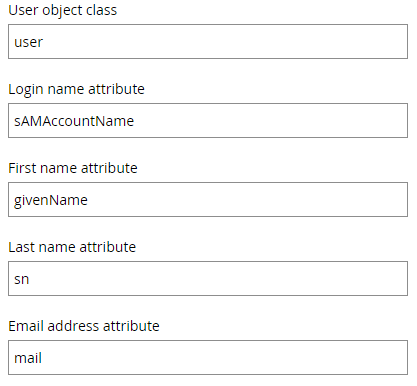
sAMAccountName | A required attribute on user objects, used as the user's login name (for example katharinah). |
user | The user attribute itself — marks an object as a user in the directory. |
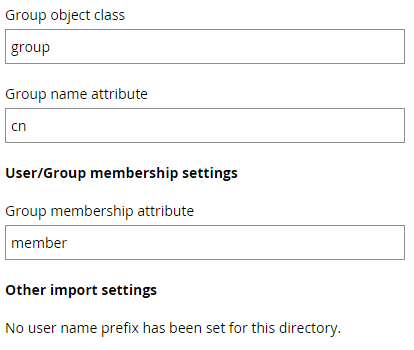
cn | Common name — the name shown in the directory (for example Hecht, Katharina). |
sn | Surname — used to display a person's surname. |
group | The group attribute itself — marks an object as a group. |
mail | The user's email address. |
ou | Organizational unit — part of the directory hierarchy. |
dc | Domain component — part of the DNS name (for example igrafx.local → DC=igrafx,DC=local). |
givenName | A person's given name. |
memberOf | Marks that a user is a member of a group. |
Steps
The example below imports only the users that belong to specific groups, plus the groups themselves — the most common arrangement. Active Directory's attribute generator (select a user or group in the directory) gives you the attributes in the correct order to copy into your filters.
Directory
The import asks for a name for the directory (any name you like), and the LDAP server name and port.

Service user
Enter the service user's distinguished name — for example:
CN=service colo,OU=Service User,OU=Colo Users,DC=ad,DC=igrafxdemo,DC=com
This reads from the bottom up: the user with the common name service colo, below the organizational units Service User and Colo Users, below the domain components ad.igrafxdemo.com. Then enter the service user's password — the platform encrypts and stores it.
Point the service user at the exact location, and update the filter whenever that location changes.
Search base
The search base is where in the hierarchy the search starts — for example DC=ad,DC=igrafxdemo,DC=com, or narrowed to an organizational unit such as OU=Colo Users,DC=ad,DC=igrafxdemo,DC=com.
The service user needs view permission on the items under this path, or the filter returns no results.
User search filter
To find users that belong to certain groups:
(&(objectCategory=Person)(sAMAccountName=*)(|(memberOf=CN=Training Preview Users,OU=Training,OU=External,OU=Colo Users,DC=ad,DC=igrafxdemo,DC=com)(memberOf=CN=iGrafx Preview Administrators,OU=External,OU=Colo Users,DC=ad,DC=igrafxdemo,DC=com)))
This finds persons with any name (*) that are a member of a group. Give each group its common name and location, as above. The leading & requires every condition to be true; the pipe (|) is a logical or.
Don't let a line feed or carriage return slip into a field such as User Search Filter. A hidden line break produces an unrelated error: Missing 'equals'; nested exception is javax.naming.directory.InvalidSearchFilterException: Missing 'equals'; remaining name 'ou=xxx users,dc=yyy, dc=zzz'.
User attributes
The platform predefines the user attributes, and they mostly don't need changing.
Group search filter
To find the groups themselves, for example all groups whose name starts with iGrafx:
(&(objectCategory=Group)(CN=iGrafx*))
Active Directory Distribution Groups import the same way as Security Groups — nothing on the platform side prevents it, as long as their membership attribute is the same attribute your Security Groups use and your group filter includes them.
Test your filters
Two free Windows tools help you develop a filter before pasting it into the import:
- Directory search dialog — run
%SystemRoot%\SYSTEM32\rundll32.exe dsquery,OpenQueryWindow, set Find to Custom Search, and test your query on the Advanced tab. - Active Directory Explorer — AdExplorer runs without installation. Connect with the same credentials your service user will use, browse to the container you plan as the search base, right-click it, and choose Search Container to build the query interactively. The dialog joins every constraint with a logical and — for an or, as in the user filter example above, combine the parts by hand.
Remaining settings
The remaining settings are predefined and can be kept as they are.
Multiple directories
More than one LDAP directory in the Directories list is uncommon — treat it as an exception and proceed with extra caution.
Give every directory a prefix to separate its namespace. If you add a second directory later, the users of the first directory most likely also need a prefix.
A user in two directories is not the same user — the same way a user isn't shared across two Active Directory domains. If a user import brings in a username that already exists in another connected directory, the second import fails unless that directory has a prefix. The same person imported into two directories with different prefixes is treated as two different users for license and permission management.
In the table, Login is what the user types as their username to authenticate. If single sign-on is set up, make sure the login matches the format your authentication provider expects.
| Scenario | Directory | Prefix | Username | Login | Comment |
|---|---|---|---|---|---|
| One directory only | Company AD | Bob | Bob | ||
| Multiple directories | AD1 | Jim | Jim | ||
| AD2 | Jim | If Jim from AD1 was imported first, Jim from AD2 isn't imported — name conflict. | |||
| AD3 | AD3 | Jim | AD3\Jim |