Process Insights
The Process Insights page lists the problems that iGrafx finds in a project's data, ranked by impact. You configure nothing: the analysis runs on its own and you read the result.
Overview
Process Insights sits in the project side navigation, between Case explorer and Smart Investigator.
The analysis starts automatically when the project's data or its end-case rule changes:
- Data indexing finishes (new data, reindexing, or migration).
- Cases are purged.
- The end-case rule is computed or changed.
A prediction indexing doesn't start a new analysis.
Findings apply only to the data and end-case rule they were computed on. After either changes, the page shows no insights until the new analysis completes.
The page is read-only. You can't start or configure an analysis from it.
Read the findings
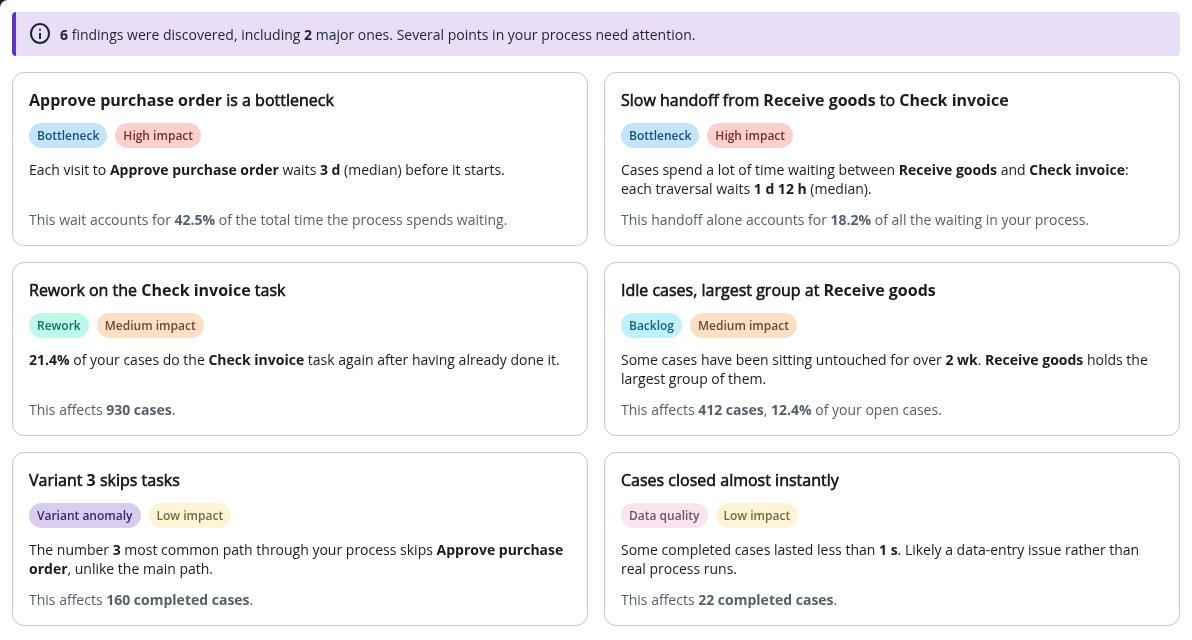
The banner at the top gives the number of findings, how many are major, and, when available, an overall assessment of the process. A major finding is a finding with high impact.
Each finding is a card with:
- A title that names the task, handoff, or variant concerned.
- A family label that tells you the kind of problem.
- An impact label: High impact, Medium impact, or Low impact.
- A sentence that describes the finding.
- A line that gives the scope, such as the number of cases affected.
Cards appear in the order the analysis returns them, strongest impact first. The number of cards varies from one project to the next.
Task names follow the family of tags you've selected.
Key concepts
Finding families
| Family | Card title | What it tells you |
|---|---|---|
| Bottleneck | Task is a bottleneck | Each visit to the task waits a median time before it starts, and this wait is a share of all the waiting in the process. |
| Bottleneck | Slow handoff from task to task | Cases wait a median time between two tasks, and this handoff is a share of all the waiting in the process. |
| Rework | Rework on the task task | A share of cases do the task again after having already done it. See Rework. |
| Rework | Cases with excessive rework | Some cases were reworked a minimum number of times. |
| Backlog | Idle cases, largest group at task | Some cases have been untouched for longer than a threshold, and the task holds the largest group of them. |
| Backlog | Idle cases pile up at task | The task holds most of the project's idle cases. |
| Backlog | Task is falling behind | More cases arrive at the task each week than leave it. The card gives the weeks of backlog, or says that no case has cleared. |
| Variant anomaly | Variant N skips tasks | The variant skips tasks that the main path goes through. See Variants. |
| Variant anomaly | Variant N adds tasks | The variant goes through tasks that the main path doesn't. |
| Variant anomaly | Variant N is slower | The variant takes several times as long as the main path (median case duration). |
| Data quality | Cases closed almost instantly | Some completed cases lasted less than a threshold, which likely points to a data-entry issue. |
| Data quality | Unrealistically long cases | Some completed cases lasted far longer than the longest normal cases, which can be real or a data error. |
Page states
When the page has no findings to show, it shows one of these messages instead.
| Message | Meaning |
|---|---|
| Your process is being analysed. Insights will appear here as soon as the analysis is complete. | The analysis is running. The page updates on its own when it finishes. |
| Your process is healthy: no insight could be found at this time to improve it. | The analysis completed and found nothing to report. |
| No insight could be found at this time to improve your process. | The analysis completed and found nothing to report, but gave no health assessment. |
| There are no insights for this project's current data. | No analysis matches the project's current data. It hasn't run yet, or the data changed since. |
| Your project doesn't hold enough cases to be analysed yet. | The project has too few cases for the analysis. |
| The analysis of your process could not be completed. | The analysis failed, or the page couldn't load its result. |